Software for construction subcontractors and small builders

For specialty subcontractors, small general contractors, remodelers, roofers, framers, estimators and schedulers: software for the paperwork that decides whether a job gets paid on time.

PayApps, the pay-app suite, is open on its Free plan: one active job, no card. Its paid plans, and the other products on this page, are in development; none is on sale yet. The free tools linked below work today, in your browser, with no account.

Start free in PayApps One active job, no card. Or try the Pay application generator with no account.
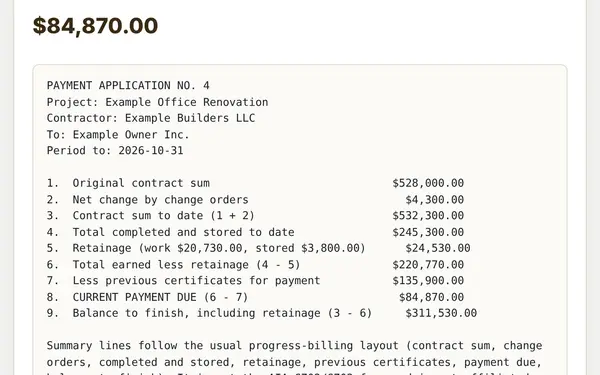
Pay application generator with its worked example loaded: Rolls a schedule of values into a G702-style pay application, retainage and all
Rolls a schedule of values into a G702-style pay application, retainage and all. The free Pay application generator, with its example loaded.

The jobs that eat the week

Monthly pay applications and retainage

Subcontractors and small GCs

Every month the schedule of values is rolled forward by hand: percent complete per line, stored materials, retainage held, previous certificates, current payment due. One wrong cell and the GC sends it back, and the payment slips another cycle. Retainage then sits unpaid until close-out.

Use it now: Pay-app suite (PayApps) Open · free on one job

Free today:

Lien waivers and lien deadlines

Subcontractors and suppliers

Each payment trades for a waiver: conditional or unconditional, progress or final. Signing the wrong one, or one that releases more than the payment covers, can give away rights. Preliminary-notice and lien-filing deadlines differ by state and are easy to miss.

Use it now: Pay-app suite (PayApps) Open · free on one job

Free today:

Slow payment and the contract terms behind it

Subcontractors waiting on the GC, and the GC waiting on the owner

The pay app was approved weeks ago and the money has not come. Whether the sub can push depends on a payment clause few people read closely and on a state prompt payment deadline that differs from job to job.

Use it now: Pay-app suite (PayApps) Open · free on one job

Free today:

  • Pay-if-paid clause reader: Paste the payment clause from a subcontract and see whether it reads as pay-if-paid or pay-when-paid, quoting the words that decided it.
  • Prompt payment laws: Deadlines after the GC is paid, by state, each linked to the statute, with a late-payment interest calculator.
  • Paid short? Reconcile the check: Split the gap between the pay app and the check into the certification cut, backcharges and the unexplained rest, and send the right waiver.
  • Joint check splitter: Split a check payable to you and your supplier, see what an endorsing supplier risks, and write the split letter and waivers.
  • California 20-day preliminary notice: Working a private California job? Who gets the notice, the last day by delivery method, what a late one covers, and a printable draft.
  • Arizona 20-day preliminary notice: Sub or supplier on a private Arizona job? Who gets the notice, the 20-day date, what a late one covers, proof of mailing, and the statutory form to print.
  • Michigan notice of furnishing: Sub or supplier on a Michigan job? Who gets the notice (the designee and the GC), the 20 days and how they wait for the notice of commencement, what a late one costs, and the MCL 570.1109 form.
  • Florida Notice to Owner: Sub or supplier on a private Florida job? The 45-day date, the 40-day certified-mail date, who gets a copy, and the statutory form to print.
  • Texas lien notice deadlines: Not paid on a private Texas job? The notice date for each unpaid month, weekend and holiday extensions, the retainage notice, the lien affidavit, and the statutory form.
  • Miller Act bond claim deadlines: Not paid on a federal job? Who can claim on the payment bond, the 90-day notice date, the one-year limit, and a notice to the prime.
  • State public job bond claims: Not paid on a state, county or city job? The little Miller Act notice and suit deadlines in thirty-one states, from each statute.
  • When will I get paid? Cash forecast: Each job’s pay-app cutoff and pay terms in; the week each payment lands, late money and your first short week out.
  • How to write an RFI: One question, the sheet and spec section, a proposed answer and a needed-by date: draft an RFI the GC answers fast, and catch answers that should be change orders.
  • Certificates of insurance: What a GC checks on your ACORD 25, the endorsement pages that prove additional insured and waiver of subrogation, and renewals that don’t stall a pay app.
  • Pay application software compared: Spreadsheet, QuickBooks, Knowify, PayAppHub, Trimble Pay and Siteline, and what GC portals charge the sub.
  • CoConstruct closing: your options: No new CoConstruct projects after 31 March 2027: where each kind of builder or sub can go, and how to move a half-billed job.

Change orders

Every trade, and the GC above them

Extra work gets done on a verbal OK, priced later, and argued over at the end of the job. A change order needs a price that covers loaded labor, materials, delay and markup, and a record of what was asked, when and by whom.

Use it now: Pay-app suite (PayApps) Open · free on one job

Free today:

  • Change order log: Approved, pending and rejected totals, the revised contract sum, billing on unsigned changes flagged, approved changes written as SOV lines.
  • T&M ticket log: Price time-and-material tickets at your own markups, flag unsigned ones and signed ones with no change order, and draft the change order request.
  • Punch list tracker: Paste the punch list from the walk-through: open, overdue, done and accepted items, the retainage still waiting on it, and one back-check email to the GC.
  • Submittal log template: Paste your submittal log: the last day to send each one worked back from lead time and review days, what is overdue back from the GC or due for resubmittal, and which needed-on-site dates are at risk.
  • Daily report template: Fill in the day on site: weather and hours lost, crew and man-hours, work, delays, deliveries and inspections. Print it, email it to the GC, and find the weekdays with no report.
  • Change orders and the schedule of values: How approved and deductive changes enter the SOV and the summary page.
  • Change order margin calculator: Price added work and see what a markup cap actually leaves you.
  • Scope creep change order calculator: Price the small extra requests before they add up.
  • Construction daily log and evidence pack: A dated daily log and change-order evidence pack, kept in your browser.
  • Construction delay claim calculator: Extended time, Eichleay overhead and liquidated damages.

Takeoff and estimating

Estimators, remodelers, roofers and framers

Quantities are measured off plans by hand, sheet by sheet, then retyped into a spreadsheet to price. A misread scale or a forgotten waste factor shows up as a lost bid or a lost margin.

Being built: Residential takeoff In development · early access

Free today:

Schedule updates

Schedulers and project managers

Each month’s P6 or Project update goes to the owner and comes back with comments about logic gaps, constraints and float that nobody checked before sending it.

Being built: Schedule checking Planned module

Free today:

  • XER schedule check: DCMA 14-point check of a P6 XER or Project XML file, with an update-to-update comparison.

BIM model checks and quantities

Design-build firms, trade detailers and estimators working from IFC

A model arrives that is supposed to meet the client’s information requirements, and nobody can say whether it does without specialist software. Quantities in the model may not match its geometry.

Being built: BIM model checking Planned module

Free today:

  • IDS model check: Check an IFC model against a buildingSMART IDS file; export failures as BCF, CSV or JSON.
  • IFC quantity takeoff: A bill of quantities from an IFC model, volumes recomputed from the geometry.

What is being built

One contractor suite, started from its sharpest job, monthly pay apps, and grown job by job. Each product below shows its real status.

Pay-app suite (PayApps)

Open · free on one job

Specialty subcontractors and small general contractors

Monthly pay applications in the G702/G703 format from your schedule of values, retainage tracked line by line until release, lien waivers collected and checked against each payment, and change orders logged so approved work reaches the next bill.

On the Free plan: pay applications (summary and continuation sheet, PDF and CSV), retainage, change orders, schedule of values import from Excel, CSV or PDF, the cash and retainage report, RFI and submittal logs, estimates, daily reports, insurance certificates.

In the paid plans, not on sale yet: lien waivers, QuickBooks Online sync, job costing and the WIP schedule.

Start free in PayApps (no card)

PayApps features and pricing

Try the free version of part of it now: Pay application generator, Schedule of values calculator, Retainage cash-flow calculator, Lien waiver checker.

Residential takeoff

In development · early access

Remodelers, roofers, siding contractors and framers

Framing, sheathing, roof and siding quantities from a house you type, draw or open as IFC or DXF, and one supplier material list a lumberyard can quote from. Wall runs, doors and windows clicked on a plan PDF in the free PDF plan takeoff open here as a plan (corners, tees and openings kept), or a vector plan PDF goes straight under the sketch at its printed scale, so walls are traced corner to corner. The paid edition is open to try while checkout is not.

Try the paid edition (early access, every feature open)

Planned: Wall runs found on a plan PDF without clicking them, Feeds estimates into the pay-app suite.

Ask for early access

Try the free version of part of it now: Wall framing takeoff, PDF plan takeoff.

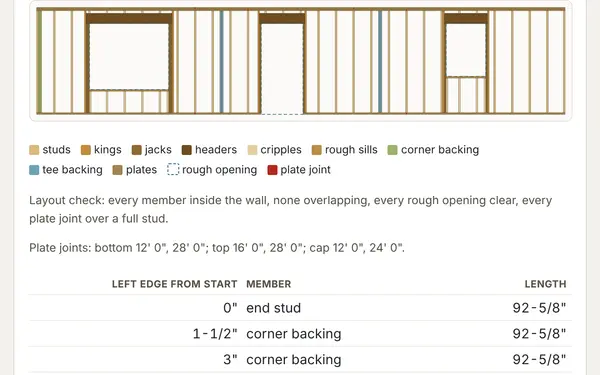
Wall framing takeoff with its worked example loaded: Draws every stud, header and cripple, then prices the lumber order
Draws every stud, header and cripple, then prices the lumber order. The free Wall framing takeoff, with its example loaded.

Schedule checking

Planned module

Schedulers and project controls on GC and owner jobs

A module of the contractor suite: check each Primavera P6 or Microsoft Project update before it goes to the owner, and see what changed since the last one.

Try the free version of part of it now: XER schedule check.

BIM model checking

Planned module

Firms that receive or deliver IFC models

A module of the contractor suite: check IFC models against the client’s information requirements (buildingSMART IDS) and pull quantities from the geometry.

Try the free version of part of it now: IDS model check, IFC quantity takeoff.

Early access: Residential takeoff

Not open yet. Leave a work email and we write once when it opens.

Kept privately, not published; only the number of sign-ups per product is public. Privacy. No script? Email us instead.

Why construction

Construction research

Open research, not products: questions studied over many sessions with the code and data published so anyone can check them. Produced with AI assistance.

Questions

Can I buy the pay-app suite today?
You can use it today: PayApps is open on the Free plan, one active job with no card (https://payapps.marisstella.app/?signup). Paid plans for more jobs are not on sale yet. The free pay application generator, pay application checker, retainage tracker, change order log and lien waiver log work too, with no account.
Are the free tools really free?
Yes. They run in your browser on this site with no account and no card, and their code is published (source available, FSL-1.1-MIT).
Do the free tools replace an accountant, a lawyer or a scheduler?
No. They help you check numbers and documents before you send or sign them. Lien rights, contract terms and retainage rules depend on your state and your contract; check with a qualified professional.
Is the construction research a product?
No. It is open research with code and results you can check. It may inform products later; nothing here sells it.

This page is built by platform/pages/industry-construction.mjs; product status changes there, in the open.