Built · in testing
Pay application software for subcontractors
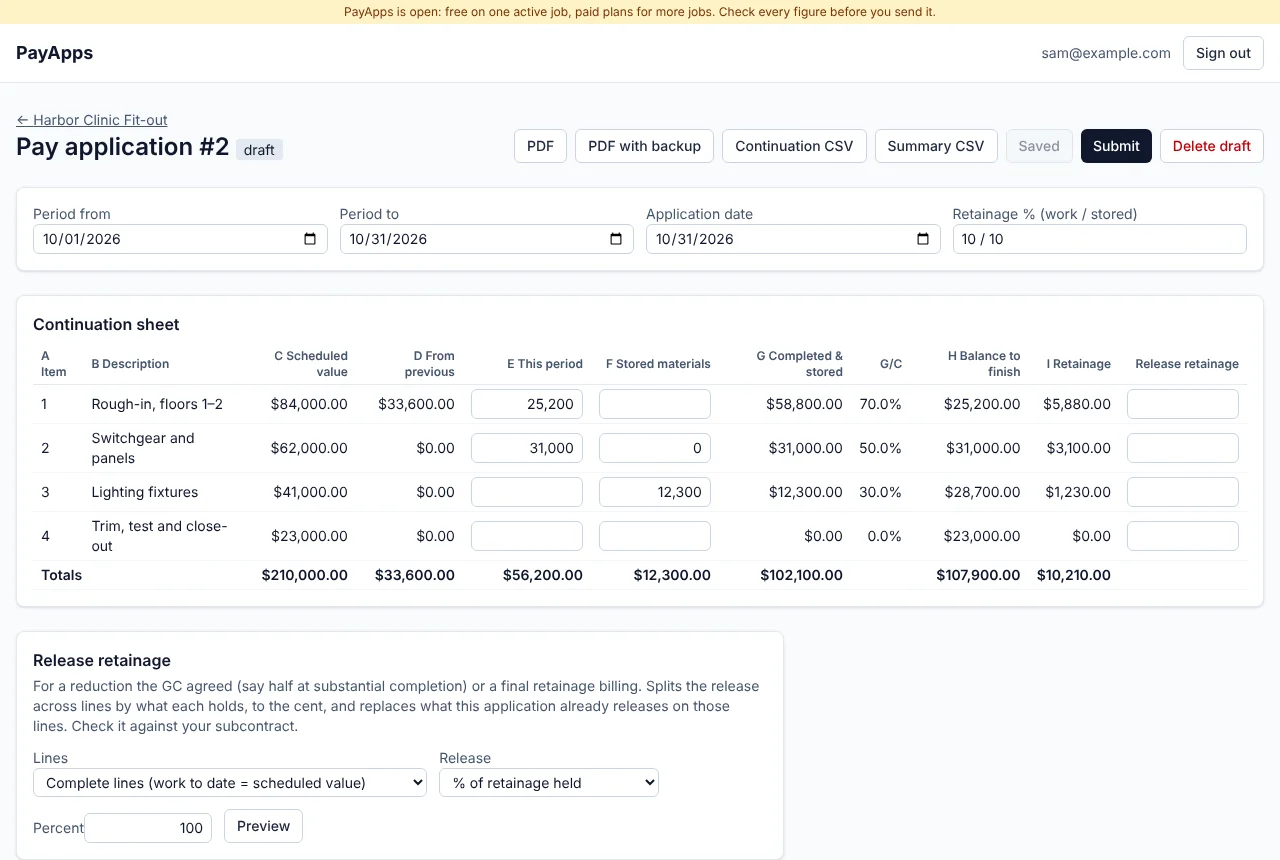
Build each month's pay application from the job's schedule of values: enter work this period and stored materials per line, and the summary page and continuation sheet follow, with retainage, change orders and previous certificates carried for you.
What it does
Enter work completed this period and materials presently stored per line; the continuation-sheet columns follow: total completed and stored, percent complete, balance to finish and retainage.
- GC billing through Procore? Each pay app has a Procore invoice sheet: the Work Completed This Period and materials-stored amounts to type into the GC's Procore invoice, line by line, with copy buttons, so it matches the G702/G703 you send. If the GC's invoice lists their own SOV positions instead of your lines, save where your lines sit under those positions once (from the subcontractor SOV template) and every pay app's sheet totals by position, with change orders listed apart. Where the stored-materials balance fell and new deliveries can't be told apart, it says so instead of guessing. Built from Procore's published help, not yet tried on a live Procore project
- GC billing through Oracle Textura? Download the This Period or To Date billing template from Textura's Upload Billing Amounts, choose it on the pay app, and download it back filled: Work This Period and Material Stored This Period, or Completed to Date (work completed plus materials stored, G703 column G), on each of your lines, matched by phase code, description or budget (change any match), with every other cell kept as Textura wrote it, ready for the same upload. Lines on no Textura row, budgets that differ from your SOV, and To Date lines where Textura already shows more than your application are pointed out. Built from Oracle's published help, not yet tried on a live Textura project
- Summary page: original contract sum, net change by change orders, total completed and stored to date, retainage, less previous certificates, current payment due
- PDF in a familiar application-and-continuation-sheet layout (our own layout, not an AIA document), plus CSV
- Draft, submitted, certified and paid, with the GC's certified amount where it differs; history that can't be rewritten
- Lender, title company or owner asking for a contractor's sworn statement (the Illinois and Michigan kind)? The job's sworn statement page lists everyone who supplied labor or material, prefilled from its purchase orders and subcontracts, checked against the contract sum and the pay app's amount due, and prints as a PDF with a jurat for the notary. The list of parties and what each was paid is saved with the job, so next month's statement starts from this month's on any computer. Which statement a draw needs, and whether it is complete, is yours to check
- GC wants it notarized? Turn on the notary block for that job and the summary page carries a jurat with blanks and a seal box under your signature
- Attach the backup to each pay app: stored-material invoices, certified payroll, insurance certificates, photos, the signed copy the GC returns
- Keep your certificates of insurance (general liability, auto, workers' comp, umbrella and others) with their policy dates: a note on the projects page 30 days before one expires, and a warning on any draft pay app dated on or after an expiry, or within 30 days before it, so a lapsed certificate doesn't hold up the payment. Tick which jobs' GCs hold each certificate: the renewal then lists every GC to send it to, drafts the email to each one from the certificate's details (you attach the PDF and send it from your own mail), and each pay app says whether its GC has the certificate on file. Type what each job's subcontract requires (coverages, minimum limits, additional insured, waiver of subrogation, primary and non-contributory, whether an umbrella may count), or read it from the subcontract's insurance exhibit PDF in your browser, each value shown with the sentence it came from for you to check, and each requirement shows as met or as a gap in words, on the job and on its draft pay app. It checks what you typed from the certificate, not the policy itself
- Keep your other compliance papers beside them: contractor's licenses by state with class and number, business license, W-9 (the date you signed it; the tax ID number is never a typed field), bonding letter, safety program, EMR letter, OSHA 300A summary and DBE/MBE/WBE certifications. Keep each one's file with it (the license card, the bonding letter PDF, and the signed W-9 only if you choose) and add it to a pay application's backup in one click. The same 30-day note and pay app warning when one with an expiry date is about to lapse, and the whole list as text to paste into a GC's prequalification form. It reads what you type and does not check a license with the state board
- One PDF to send the GC: the application, an index of every attached file and the page it starts on, then the PDF and photo backup, every page numbered (files a PDF can't hold, like spreadsheets, are listed to send separately); change orders get the same packet with their pricing backup
Plans
Every plan, including Free on one job. See pricing; every module works on the same jobs, so nothing is entered twice.
Free guides on this
Common questions
Which PayApps plans include it?
Every plan, including Free on one job. Free on one job with no card. Paid plans for more jobs are not on sale yet.
Is PayApps new?
Yes. It opened in November 2026 and has no customers, reviews or published results yet. Everything on this page works in the app today; check every figure before you send it.
The rest of PayApps
PayApps is not affiliated with the American Institute of Architects (AIA) and does not produce AIA Contract Documents. Nothing on this site is legal advice.