In the app today
Quotes your customer can accept online, with a PO number
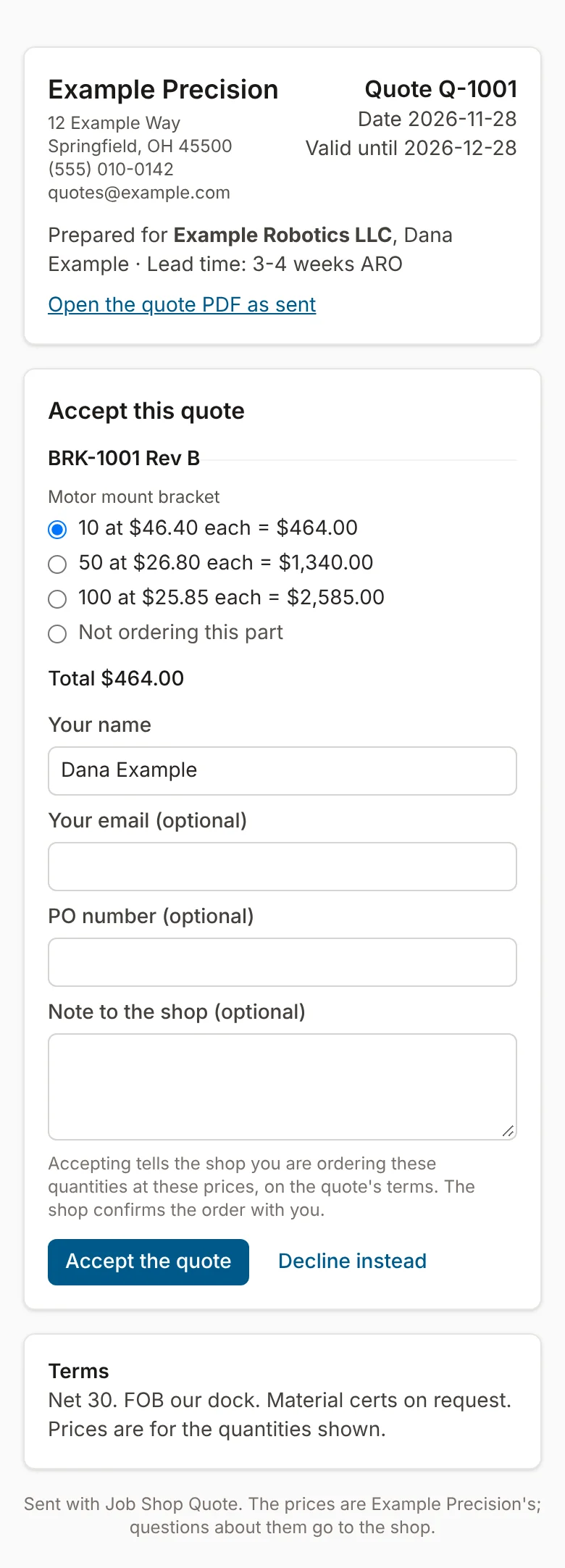
Once the estimator marks a quote sent, the app emails the exact PDF and can add a link where the customer accepts or declines without an account. An acceptance marks the quote won at the quantity they chose; a decline marks it lost with their reason.
What it does
- "Email to customer" sends the PDF frozen at sending (checked against its SHA-256), From your shop, Reply-To the estimator, with the shop's signature
- The customer's link shows the quote as sent and the PDF, never rates, costs or markups; they pick one quoted quantity per part, type a name and an optional PO number and note
- Accepting marks the quote won at the chosen breaks' total with the PO; declining marks it lost with "Declined online" and the reason
- The estimators who made or emailed the quote get the answer by email; links can be turned off at once
What it does not do yet
- One answer per quote; a quantity the quote does not carry needs a new quote
- No e-signature line on acceptance yet
- The app never sends a quote by itself: an estimator presses send
Free guides on this
Common questions
Which plans include it?
Every plan, including the free Early access plan (up to 40 RFQs a month, 3 people, no card). Plans differ by RFQs a month and seats, not by features. Paid plans start at $199 a month and are not on sale yet.
Does my customer need an account?
No. The link opens the quote as it was sent. Only a hash of the link's token is stored, and the link takes no answer past the quote's valid-until day, and stops working when you turn it off.
Is Job Shop Quote new?
Yes. It opened in November 2026 and has no customers, reviews or published results yet. What this page describes works in the hosted app today; check every price, time and quantity before you send a quote.
The rest of Job Shop Quote
Every part works on the same rate card and the same quotes, so nothing is typed twice.