In the app today
CNC quoting software that prices from your own rate card
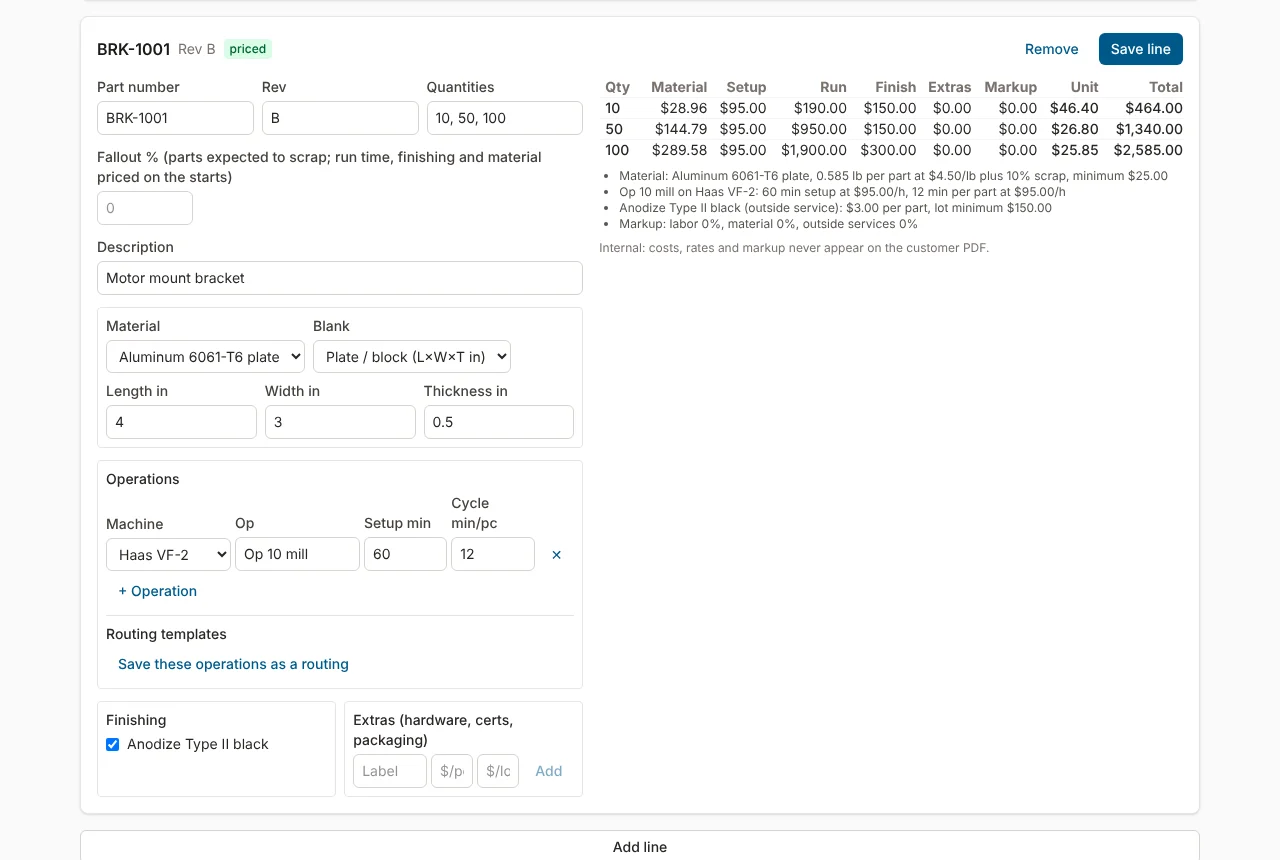
For the owner or estimator who quotes machined parts today in a spreadsheet or from memory. You enter your machines, materials and outside processes once; each quote line is then priced by plain arithmetic on those rates, with every figure showing the rate it used.
What it does
- A rate card of machines (hourly rate, optional setup rate, default setup), materials (per lb with density and scrap, per stock piece or by the foot, with a minimum charge), finishing and outside services (per part with a lot minimum), markups on labor, material and outside work, and a line minimum
- Each line priced at every quantity break from setup, cycle time, material and finishing, with the rates frozen into the quote so later rate changes never move a sent price
- Blocking issues instead of guesses: a line missing a cycle time, a material price or a blank size says so and is not priced
- Import the rate card from your own spreadsheet (.xlsx or CSV, read in the browser), and download it again as one Excel workbook with a tab per kind
- A quote PDF on your letterhead with your logo, showing prices, dates, lead time and terms and none of the costs, rates or markups behind them
- Revisions (Q-1001 Rev 2) with what changed from the last one, side by side, and an optional "Changes from" section on the customer PDF
- A default fallout percentage, so 100 good parts at 3% start 104 without typing it on each line
What it does not do yet
- Reading RFQ emails and PDF drawings with AI is built but not switched on in the hosted app yet; until it is, labelled lines and parts tables are read by fixed rules and you enter the rest
- Setup and cycle times are yours to enter, or suggested from STEP and DXF measurements at the rates you set; nothing is assumed
- No ERP connection is on yet; the quote is a PDF you download or email
Reading RFQ emails and PDF drawings with AI is built but not switched on in the hosted app yet. Until it is, the app reads them by fixed rules: labelled lines (Part number, Qty, Material, Finish, Due) and parts tables with a header row, each value shown with the line it came from. You check those and enter the rest yourself.
Free guides on this
- How to quote a CNC machining job
- How to quote CNC turning and lathe parts
- How to quote outside processing (heat treat, plating)
- How to set quantity price breaks
- How to work out a machine shop hourly rate
- Machine shop markup and margin
- Machine shop quote template (free CSV)
- Machine shop quoting software compared
Common questions
Which plans include it?
Every plan, including the free Early access plan (up to 40 RFQs a month, 3 people, no card). Plans differ by RFQs a month and seats, not by features. Paid plans start at $199 a month and are not on sale yet.
Where do the prices come from?
Only from your rate card. The same inputs always give the same price, every line lists the rates it used, and a value the app cannot work out stops the line instead of being guessed.
Is Job Shop Quote new?
Yes. It opened in November 2026 and has no customers, reviews or published results yet. What this page describes works in the hosted app today; check every price, time and quantity before you send a quote.
The rest of Job Shop Quote
Every part works on the same rate card and the same quotes, so nothing is typed twice.