Open now · free on one platform
Know what you actually made on every sale
Seller Books is bookkeeping for people who resell on eBay, Poshmark, Mercari, Whatnot, Depop, Etsy, Shopify, Amazon, TikTok Shop, Square, PayPal, Venmo and Cash App, and Grailed, StockX, Vinted, Reverb or any other marketplace whose sales file you can download as CSV. It brings your sales from every platform into one ledger, takes out the fees each platform actually charged, matches what you paid for each item, logs your sourcing miles, and builds a Schedule C worksheet you or your tax preparer can work from. It is open now: free for one platform and up to 25 orders a month, with no card. Paid plans for more platforms and orders are not on sale yet.
What it looks like in the app
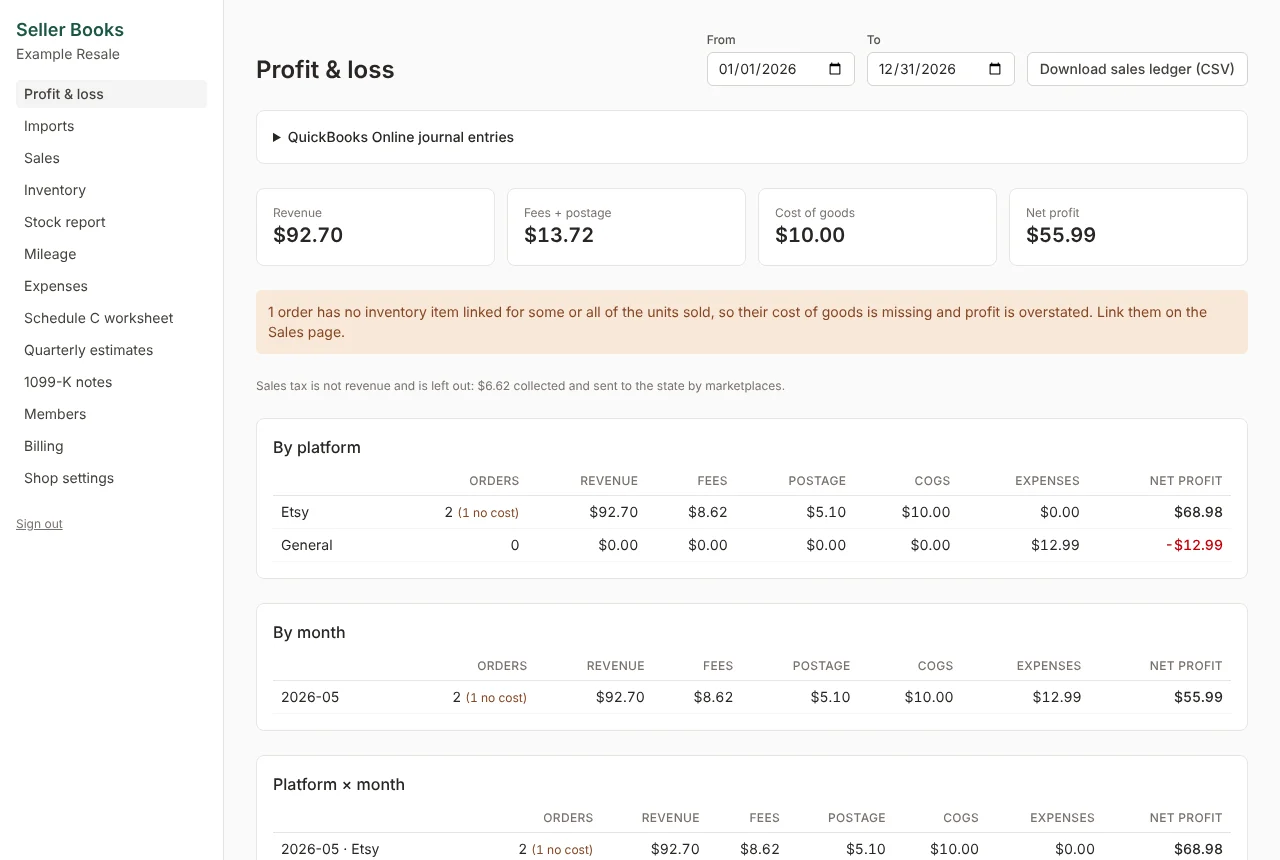
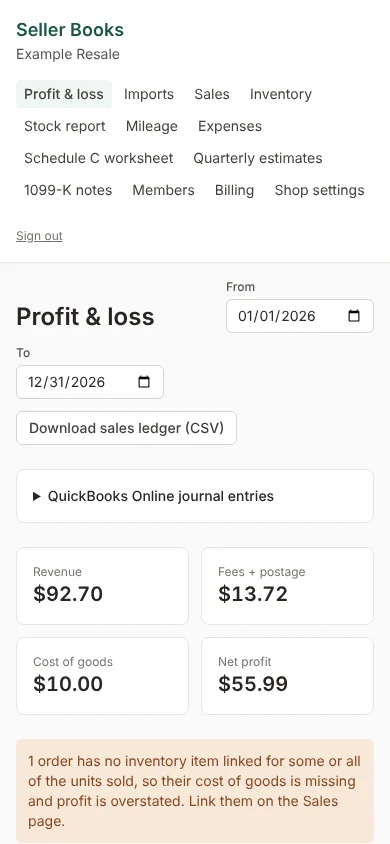
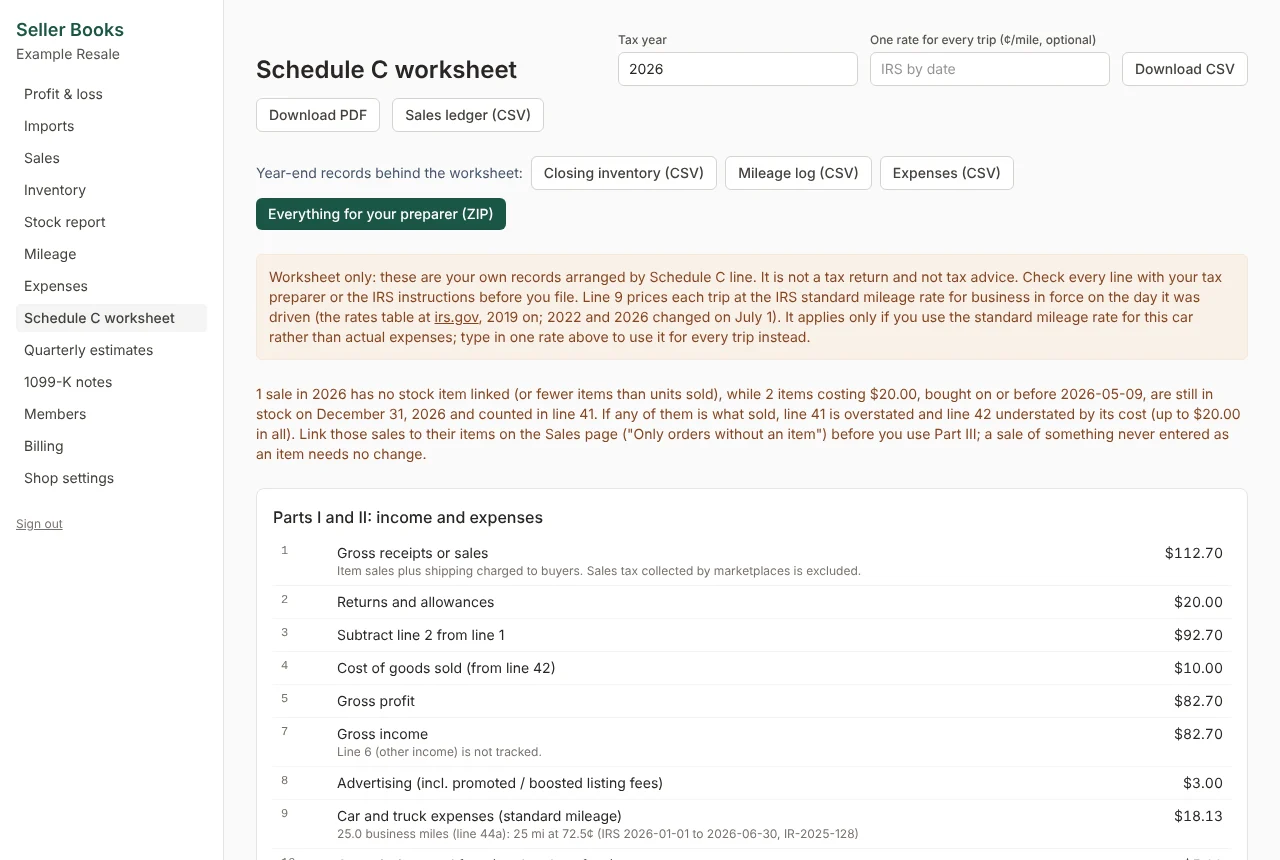
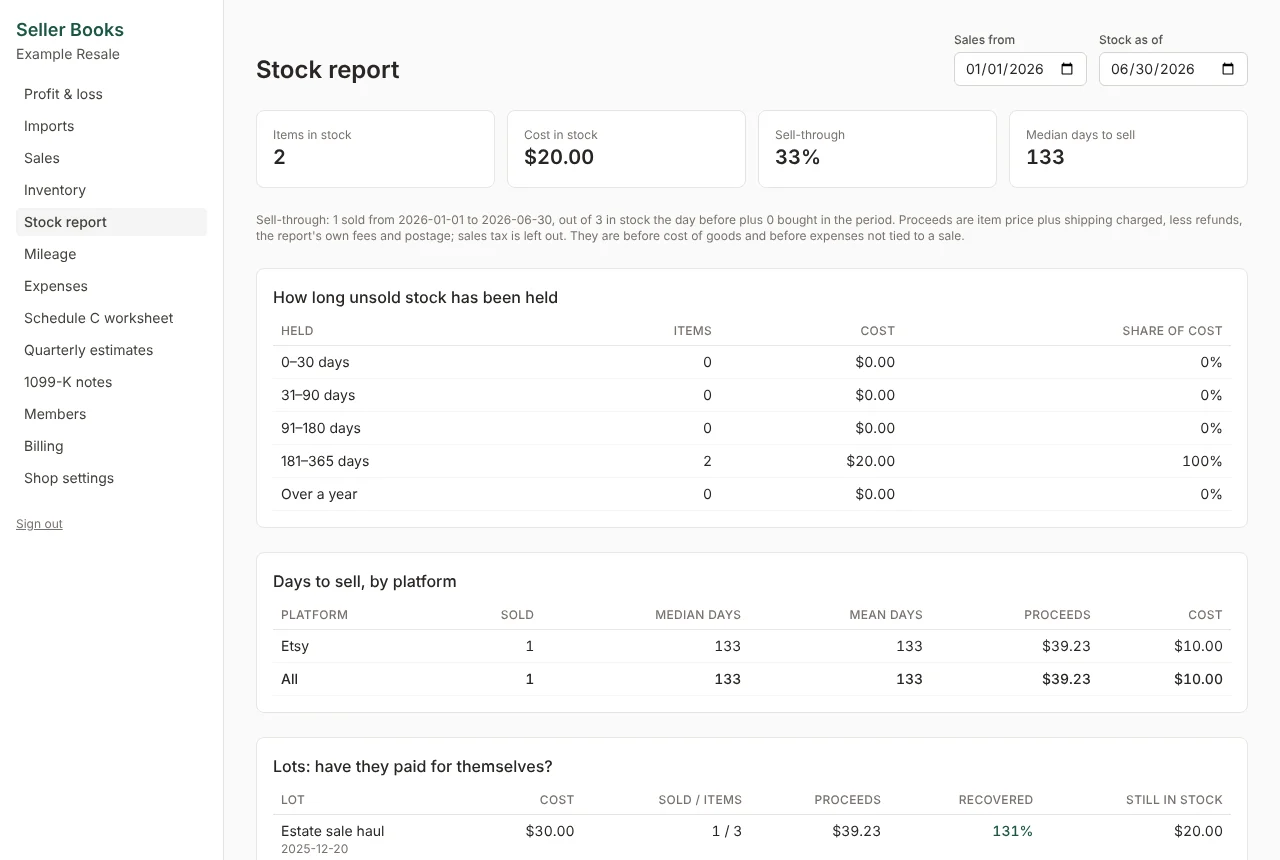
Screenshots of the app with one made-up Etsy shop: its orders file and monthly statement, a $30 estate-sale lot of three items, one supplies receipt and one sourcing trip. The shop and its numbers are invented; the arithmetic is the app's.
Payout is not profit
A platform payout is the sale minus that platform's fees. It doesn't know what you paid for the item at the thrift store, the shipping supplies you bought, the miles you drove to source, or the sale you made on a different app the same day. Profit needs all of it in one place.
An invented example, to show the arithmetic:
| Buyer paid for the item | $40.00 |
|---|---|
| Platform fees on this sale | −$6.10 |
| Shipping label you paid | −$5.25 |
| What the item cost you | −$8.00 |
| Profit on the sale | $20.65 |
The payout for this sale would show $33.90 before the label, or $28.65 after it. Neither is the profit: the platform doesn't know the item cost you $8.
What Seller Books does
Every part of this is in the app today, on the Free plan as well as the paid ones.
True profit per sale, across every platform
Each sale's price, platform fees, postage and item cost in one ledger, from eBay to Square to any marketplace's CSV.
How it works
One ledger for eBay, Poshmark, Mercari, Whatnot, Depop, Etsy, Shopify, Amazon, TikTok Shop, Square, PayPal, Venmo and Cash App. Grailed, StockX, Vinted, Reverb and any other marketplace come in from their own CSV: you say once which column is which, and Seller Books keeps the choice. Each sale shows what the buyer paid, every fee the platform took, shipping you paid, and what the item cost you, so the number at the bottom is profit, not payout. Sales with no marketplace report (cash at a market, a local pickup paid by Zelle) are typed in and counted the same way.
Fees from your own reports, not a rate table
The fees each platform actually charged you, read from its own sales and payout reports, so the books match your bank.
How it works
Platform fees change often and differ by category. Seller Books reads the fees you were actually charged from each platform's sales and payout reports, so the books match what landed in your bank account.
Cost of goods that follows the item
Record what you paid, lots and bins split across their items; the cost moves to cost of goods when the item sells.
How it works
Record what you paid when you source, including bulk lots and bins split across the items in them, evenly or by what each piece should sell for, so a $5 shirt in a mixed bin does not carry the same cost as the coat beside it. When an item sells, on whichever platform, its cost moves to cost of goods sold; what's unsold stays as inventory at the end of the year. Already track purchases in a spreadsheet? Save it as CSV and import it; you see what will be added before anything is saved.
Know what's sitting unsold, and whether a lot paid off
How long unsold items have sat, days to sell by platform, and whether each lot and source has paid for itself.
How it works
A stock report shows how long your unsold items have been on the shelf and what they cost you, your sell-through and median days to sell on each platform, for every bin, pallet or estate-sale haul how much of its cost its sales have earned back, and profit and return on cost by where you bought (which thrift store, estate sale or supplier pays). Computed from your own imports and purchase records, nothing estimated. Beside it, “price an item” takes the fees each platform actually charged on your last year of orders, ads and postage included, and shows what an item would net on each one and the price that leaves the profit you want.
Sourcing miles
Log or import sourcing trips; the worksheet prices them at the IRS standard rate for each trip's date.
How it works
Log trips to thrift stores, estate sales and the post office with date, purpose and miles. The worksheet shows them with the IRS standard mileage rate for the trip's date, or keeps them as a record if you use actual car expenses instead. Already let a mileage tracker app record your drives? Export them as CSV and import the business trips, each with its purpose; personal drives are left out.
A Schedule C worksheet
Year-end totals on the Schedule C lines, with one ZIP of every record behind them for your tax preparer.
How it works
At year end you get your totals grouped the way Schedule C (Form 1040) asks for them: gross receipts, returns, cost of goods sold with beginning and ending inventory, car and truck, commissions and fees, supplies and other expenses, and the home office line by the simplified method if you keep your stock at home. One download gives your tax preparer everything behind it in a ZIP: the worksheet, every sale and fee, the closing inventory, the mileage log, the expenses and the receipt photos or PDFs you attached to them, with a note saying which line each file adds up to. A worksheet for you or your tax preparer, not a filed return.
Quarterly estimated tax from your own books
What to have paid by each federal due date, figured two ways from the profit in your books.
How it works
For each of the four federal due dates (April, June, September and January), what to have paid so far, figured two ways: a quarter of the year's required payment (the smaller of 90% of this year's tax or 100% of last year's, 110% above $150,000 of AGI), and the annualized method on Form 2210 Schedule AI, which asks less early in the year when your sales come in the fourth quarter. It uses the profit in your books to each period's end. Once a date has passed short, it shows the underpayment penalty so far and what another month unpaid would add. An estimate to check with your tax preparer, not tax advice.
Check a 1099-K against your books
Type in a platform's 1099-K and see it beside your books, with the months that don't match named.
How it works
Type the figures from a platform's Form 1099-K and see them beside your books for that platform and year: item sales, then with the shipping buyers paid, then with the sales tax the platform collected. Type the monthly boxes too and the months that don't match are named, such as a month whose report you haven't imported or a sale dated at the end of one month by you and the start of the next by the platform. The form counts payments before refunds and fees, so it is usually higher than your profit; this shows where the difference comes from. Nothing you type is saved.
Did I import everything? Check your deposits
Set your bank statement's payouts against what your books expect, month by month, to find a report you haven't imported.
How it works
Upload the statement of the bank account your payouts go to. Each deposit that names a platform is set against what your books say that platform should have paid you (sales and shipping, less refunds, fees and postage), month by month. A month with Mercari deposits and no Mercari sales in your books is a report you haven't imported; deposits running behind your books usually mean money still on the platform or paid to another account. You see every deposit it matched and can untick one that isn't a payout, such as a refund of something you bought. The statement isn't saved.
The sales tax you collected yourself, by month and quarter
Tax on sales no marketplace sent on (Square, PayPal, Venmo, your own store, cash), listed apart with a CSV for your return.
How it works
Sales tax a marketplace collected on your sales there was sent on by the marketplace, and Seller Books keeps it out of your income. Tax on the sales you rang up yourself is different: Square at a market booth, PayPal and Venmo payments, your own Shopify store, and the cash sales you type in with their tax. No marketplace sent it on, so Seller Books lists it apart, by month and channel with quarter totals and the tax you handed back on refunds, and downloads it as a CSV to fill your sales tax return from. Which sales are taxable, and in which state, is for you or your tax preparer.
Monthly journal entries for QuickBooks Online
One entry per platform per month, on the accounts you name, ready for QuickBooks Online's journal-entry import.
How it works
Already keep your books in QuickBooks Online, or your accountant does? Download your sales as journal entries for its journal-entry import: one entry per platform per month, with sales, shipping charged, refunds, fees, ads, postage and subscriptions on their own accounts and the net on a clearing account for each platform, so a payout is a transfer from that account to your bank. You name the accounts; cost of goods can go against an inventory account if that is how your books work. Sales tax a platform collected stays out.
17 platforms, one set of books
- eBay auctions and fixed-price listings across almost every category
- Poshmark clothing, shoes, accessories and home goods, sold through listings, offers and Posh Shows
- Mercari general secondhand goods, from electronics to collectibles
- Whatnot live-stream auctions and sales, from trading cards to clothing
- Depop secondhand and vintage fashion
- Etsy vintage items (20 years or older), handmade goods and craft supplies
- Shopify your own online store, often alongside the marketplaces, for repeat buyers and items you would rather not pay a marketplace fee on
- Amazon retail and online arbitrage, books and wholesale lots, shipped yourself or sent in to Fulfillment by Amazon (FBA)
- TikTok Shop products sold through short videos, live streams and creators who promote your listings for a commission
- Square sales at flea markets, craft fairs, pop-ups and a booth in an antique mall, taken on a Square card reader or rung up in the Square app
- PayPal sales paid into your PayPal account with no marketplace payout behind them: a local pickup, a Facebook Marketplace or Instagram sale paid by goods and services, or your own site's checkout
- Venmo sales paid by Venmo with no marketplace payout behind them: a local pickup, a flea market or a Facebook Marketplace sale, on a personal or a business profile
- Cash App sales paid by Cash App with no marketplace payout behind them: a local pickup, a flea market or a Facebook Marketplace sale, on a personal or a business account
- Grailed menswear, streetwear and designer clothing
- StockX sneakers, streetwear, trading cards and collectibles, sold at an ask
- Vinted secondhand clothing, shoes and accessories
- Reverb guitars, amps, pedals, synths and other music gear
What it won't do
- It won't file your taxes or tell you what to deduct. Seller Books is bookkeeping software, not a tax adviser. It organises your numbers; what you deduct and how you file is your decision, or your tax professional's.
- It won't guess your fees from a published rate. It uses what each platform actually charged you.
- It won't invent a cost for an item you didn't record. Missing costs are flagged for you to fill in.
Try Seller Books on your own numbers
Free for one platform and up to 25 orders a month, with no card; paid plans are not on sale yet. Import one platform's report and see your profit after fees and cost of goods.